
How This VPN Was Made to Work and Keep Your Privacy in the Real World
Hey, it’s Steve.
A lot of people get this wrong with VPNs, so let me explain it to you.
A lot of people think that a VPN is easy to use: just click a button and you’re “protected.” Finished.
In practice, though, not all VPNs work the same way.
There is a big difference between:
• a VPN that really keeps your data secure and stays fast
• and one that slows down your internet while still leaking information
So let’s talk about how a VPN that was made the right way works in simple terms.
The Main Idea: Balance
A VPN made for real life is all about finding the right balance:
• high security (privacy)
• without slowing down your speed (performance)
This equilibrium derives from three main areas:
• engineering for privacy
• engineering for performance
• engineering for real-world use
Let’s take it one step at a time.
1. Engineering for Privacy in the Real World
This is the base.
Nothing else matters if privacy is poor.
Here’s what a real VPN performs in the background:
Strict No-Logs Policy
This is very important.
A VPN you can trust won’t keep any information about you, such as:
• history of browsing
• DNS requests and connection metadata
Why this is important:
You can’t steal, ask for, or sell data that doesn’t exist.
It’s simple logic: if there is no data, there is nothing to expose.
AES-256, or Advanced Encryption
This is the standard for encrypting very private information.
What it means is:
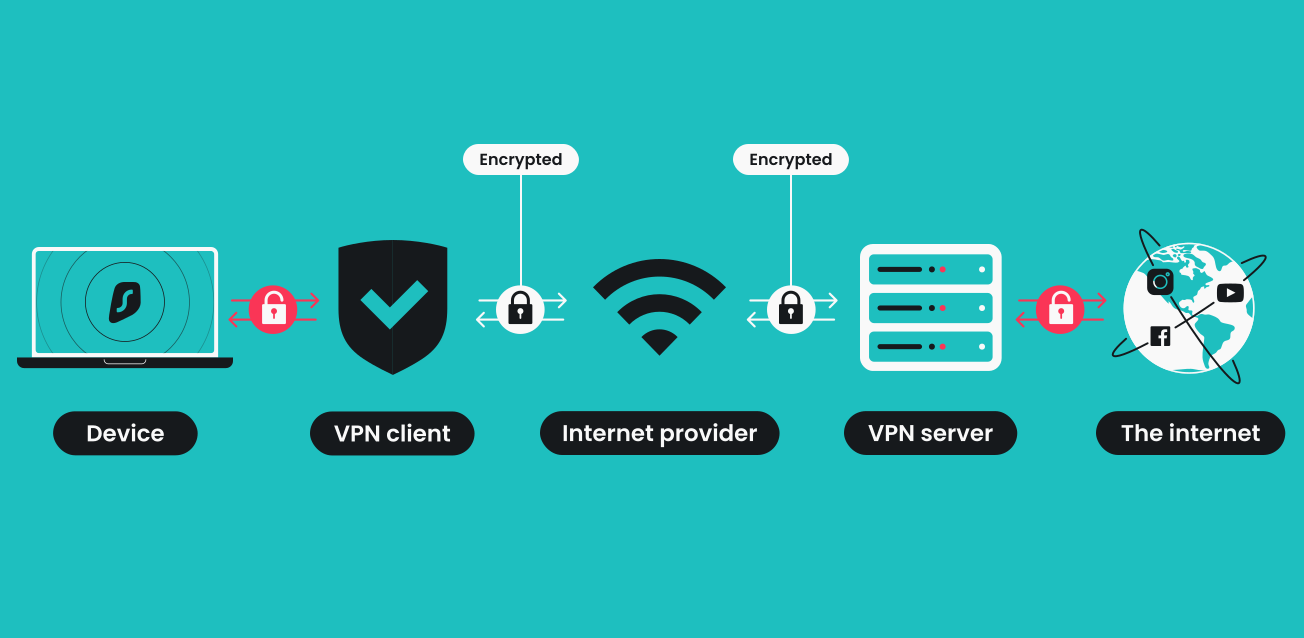
Your data is transformed into code that can’t be read. Only someone with the right key can read it.
If you don’t have that key:
It would take longer than the universe’s age to break.
So even if someone gets your data, they won’t be able to read it.
Kill Switch That Works Automatically

Most individuals don’t pay attention to this until they need it.
If your VPN connection suddenly goes down:
Normally, your device would reconnect without any protection.
That won’t happen because of the kill switch.
It cuts off your internet right away. So no information ever gets out of the encrypted tunnel.
Protection Against DNS and IPv6 Leaks
This is a risk that isn’t obvious.
Even if you have a VPN on:
Your device can send queries straight to your ISP, skipping the VPN connection altogether.
A VPN that is safe:
• sends all traffic, even DNS, over the encrypted tunnel
• no leaks or exceptions
Servers with just RAM
This is high-level security.
Instead of putting data on hard drives:
RAM (temporary memory) is what servers use to run.
Why it matters:
RAM needs power to store data.
If you turn off the server, everything is suddenly deleted.
If there is no stored data, there is nothing to get back.
2. Engineering for Performance
Just having security isn’t enough.
People won’t utilize a VPN if it is slow.
This is how well VPNs keep their speed:
WireGuard Protocol
This is a new type of VPN protocol.
When compared to previous ones like OpenVPN:
• Faster
• More efficient
• Less burden on the system
Less overhead means faster and better performance.
In 2026, a VPN that doesn’t support it is no longer useful.
Server Network with 10Gbps+

Servers are like roads for your data.
Slow servers cause traffic congestion, while fast servers keep things moving.
A good VPN uses:
• infrastructure with speeds of 10 Gbps or more
Outcome:
• no traffic jams
• speeds that stay the same
• fewer slowdowns
Split Tunneling
This feature lets you take charge.
You have the option to:
• choose which apps connect to the VPN
• and which ones connect to the conventional network
For example:
• Banking app: through VPN (safe)
• Local apps: outside VPN (faster)
You get both safety and speed.
Optimized Server Locations
Distance is important.
• Less latency when the server is closer
• Less latency means a faster response
VPNs that have a lot of locations:
• allow you connect to the server that is closest to you
This makes things better for:
• video calls
• gaming
• streaming
3. Uses in the real world
Now let’s put all of this into action.
Protecting Public Wi-Fi
Public networks, including those in airports, cafes, and hotels, are dangerous.
Not protected:
It’s easy to get your info.
Using a VPN:
• everything is encrypted
• important data is safe
Avoiding ISP Throttling
ISPs can:
• find out what you’re doing (streaming, gaming)
• slow down your connection on purpose
A VPN keeps your behavior private.
Your ISP can’t see what you’re up to. So they can’t slow down certain types of traffic.
Accessing Geo-Restricted Content
Some content is dependant on where you are.
Using a VPN:
• You connect to a server in another nation
• websites think you’re there
For example:
• connect to a server in the UK to get UK content
One More Thing
Don’t use free VPNs.
This is why:
• limited speed
• limited data
• often make money by selling user data
VPNs that you pay for:
• give true security
• greater performance
• real accountability
Last Words of Advice
When picking a VPN, look for:
• no-logs rule
• AES-256 encryption and a kill switch
• protection against DNS leaks
• support for WireGuard and a powerful server network
• servers that just use RAM (advanced level)
If you do these things right, your VPN will work.